

By the 1ink.com team. Updated October 29, 2026. 6-min read.
Quick answer: On Brother black-and-white laser printers, the toner sits inside the drum unit. You take both out together, use the green lock lever to swap the toner, then put them back.
Quick steps:
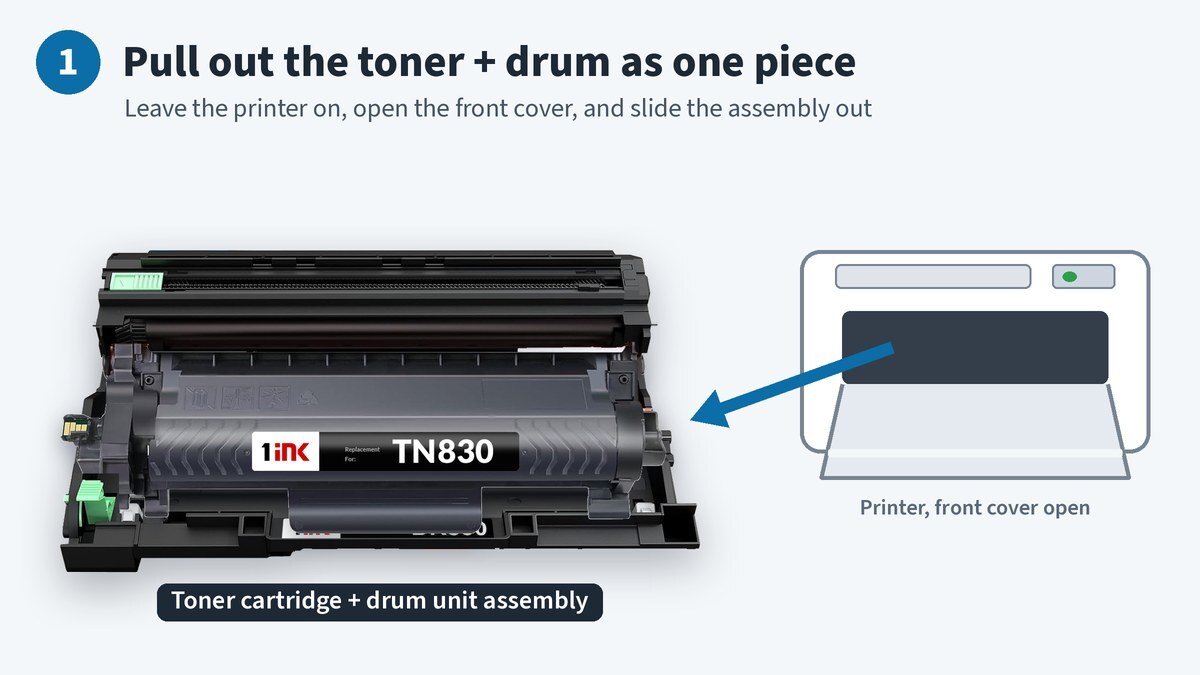
- Leave the printer on and open the front cover.
- Pull out the toner and drum as one piece.
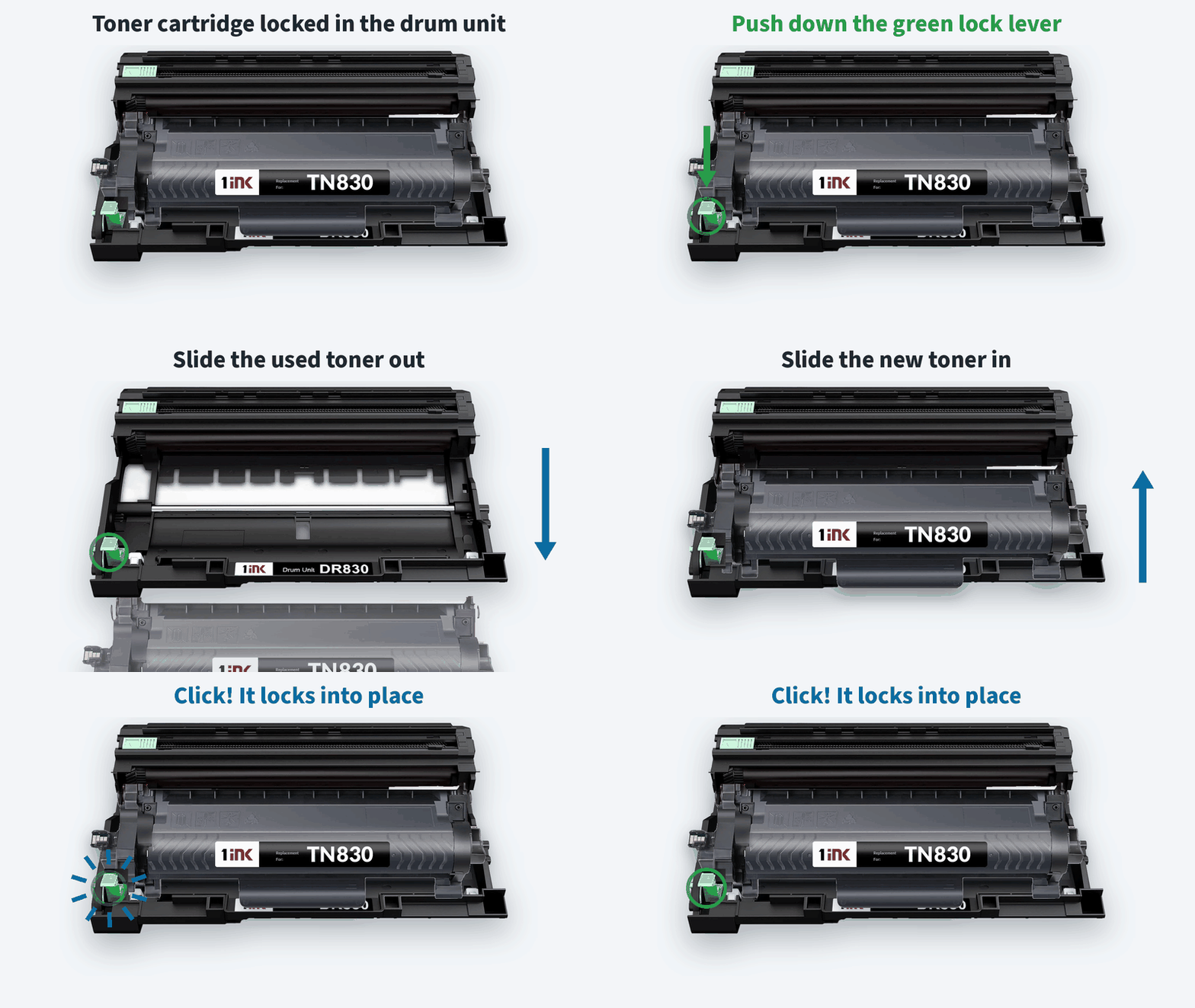
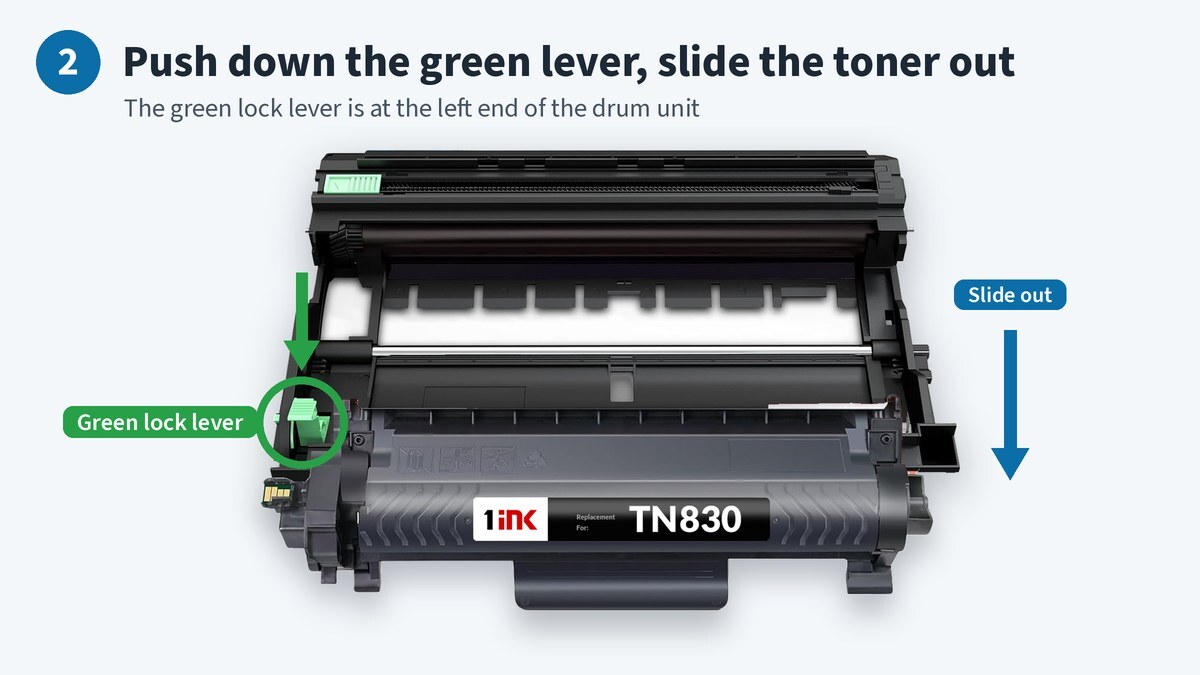
- Push down the green lever and slide the toner out.
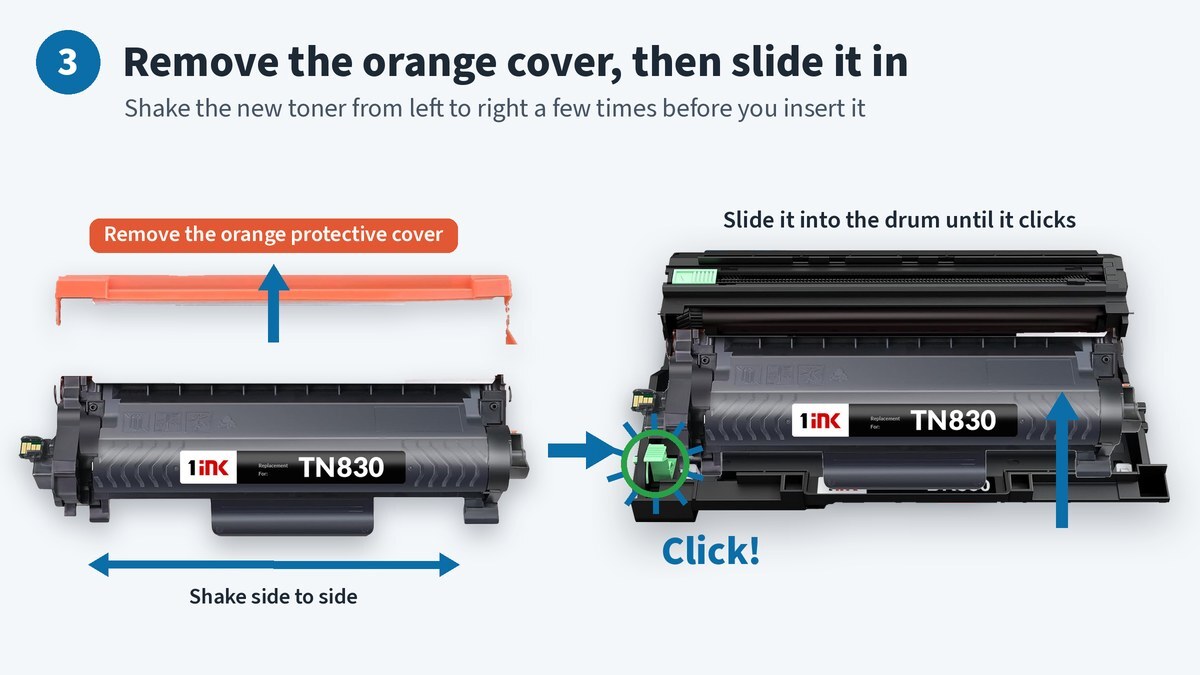
- Shake the new toner side to side and remove its protective cover.
- Slide the new toner into the drum until it clicks.
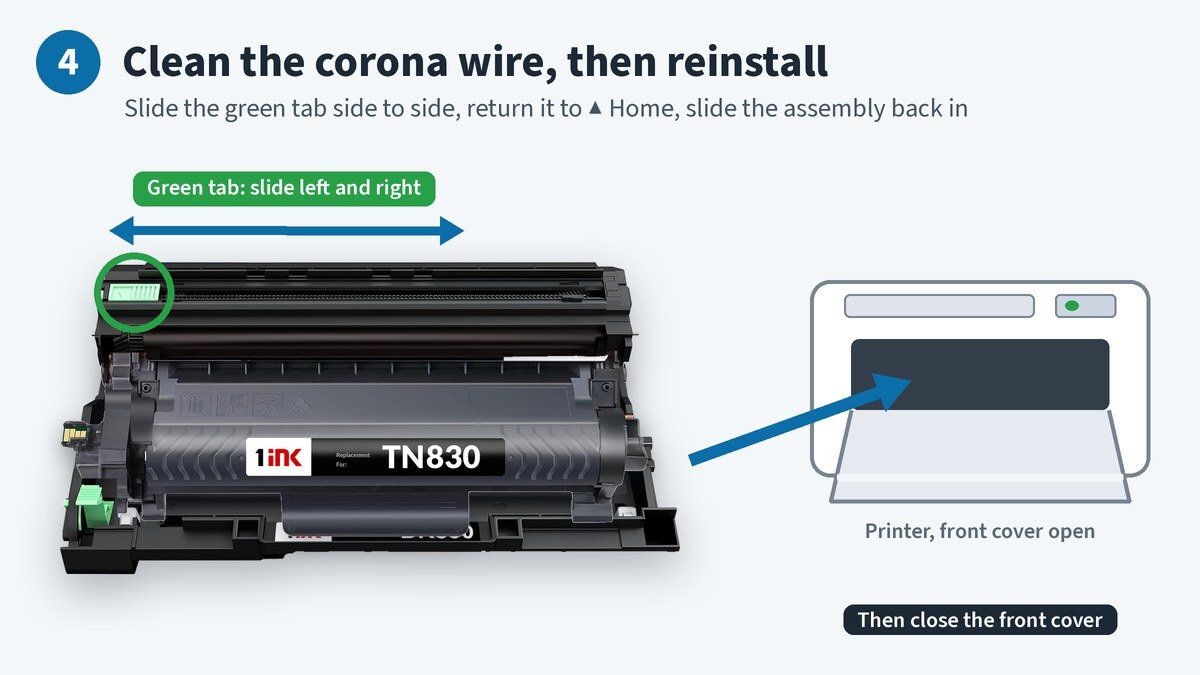
- Slide the green tab to clean the corona wire.
- Put the assembly back and close the cover.
|
Key takeaways
|
What's the difference between toner and the drum unit?
The toner cartridge holds the powder. The drum unit holds the toner and transfers the image to paper.
Brother calls them "two separate supplies" and says to install them "as an assembly." You'll swap toner often and the drum much less.
How do you replace the toner in a Brother laser printer?
These are Brother's steps for printers that use TN830 toner and the DR830 drum, like the HL-L2460DW, DCP-L2640DW and MFC-L2900DW. TN760/DR730 models like the HL-L2350DW use the same steps.
- Leave the printer on and open the front cover. If you just printed, Brother says to wait about 10 minutes so the fan can cool the hot parts inside.
- Pull out the toner and drum unit assembly. Set it on a flat surface with scrap paper or cloth under it, in case toner spills.
- Push down the green lock lever and slide the toner out of the drum.
- Unpack the new toner. Hold it level with both hands and gently shake it side to side several times. Then remove the protective cover. On our 1ink TN830, it's orange.
- Slide the toner into the drum and push it in firmly until you hear it lock. If it's seated right, the green lever lifts on its own.
- Clean the corona wire. Gently slide the green tab left and right several times. Return it to Home (▲) so its arrow lines up with the arrow on the drum. If you don't, pages may print with a vertical stripe.
- Slide the assembly back in and close the front cover.
- Don't turn the printer off or open the cover until "Please Wait" clears and it's back to Ready.
What else should you know before you start?
- Spilled toner? If it gets on your hands or clothes, Brother says to wipe or wash it off with cold water right away.
- Unpack only when ready. Brother says toner left out of its package for a long time won't last as long.
- Recycle the old one. Brother runs a free mail-in recycling program for its own toner and drums.
How are Brother color lasers different?
Brother color lasers have a separate toner-and-drum assembly for each color under the top cover. For those steps, see How to Replace Brother Color Toner Cartridges. Brother color inkjets have no drum — you just swap the ink cartridge. For example, see our MFC-J4355DW ink cartridges.
When should you replace the drum unit?
Watch the printer's display:
- Drum End Soon: the drum is near the end of its life. Order a new one.
- Replace Drum: it's time to replace the drum unit.
- Drum !: the corona wire needs cleaning. This doesn't mean the drum is worn out.
To replace the drum, follow the same steps. Unpack the new drum unit, remove its protective cover, and lock your toner into it.
How do you reset the drum counter on a Brother printer?
Reset it only after you put in a new drum. Brother says, "DO NOT reset the drum counter unless you are replacing the drum unit."
Brother's key steps depend on the model:
- HL-L2405W, HL-L2420DW, HL-L2460DW: with the printer on and the cover closed, press OK and ▲ together. Press OK to select [Drum], then select [Reset].
- DCP-L2640DW, HL-L2465DW: press OK and ▲ together. Press OK to select [Drum], then press ▲ to reset.
- MFC-L2900DW and other touchscreen models: close the front cover and clear the error message. Press the Toner icon until the message changes. Press [Drum], then [Yes].
- Color models: see How to Replace Brother Color Toner Cartridges.
What do the toner and drum cost?
Prices for our compatible supplies were checked on 1ink.com on October 22, 2026.
| 1ink compatible supply | Fits | Price | Rated yield | Cost per page |
|---|---|---|---|---|
| TN830XL toner | HL-L2460DW, DCP-L2640DW, MFC-L2900DW | $38.99 | 3,000 pages | about 1.3¢ |
| DR830 drum | Same as TN830XL | $39.99 | 15,000 pages | about 0.27¢ |
| TN760 toner | HL-L2350DW, HL-L2370DW, DCP-L2550DW, MFC-L2710DW | $23.95 | 3,000 pages | about 0.8¢ |
| DR730 drum | Same as TN760 | $28.99 | 12,000 pages | about 0.24¢ |
Find the right supplies by model: HL-L2460DW, DCP-L2640DW and MFC-L2900DW. Still choosing a printer? Read Best Printer for Home Use in 2026.
What if the printer still shows an error?
Most errors after a swap mean a part isn't seated:
- Re-seat the toner. Seeing "No Toner," "Cartridge Error" or "Cannot Detect"? Brother says to take the toner out of the drum, put it back in, and reinstall the assembly.
- Check the lever. The green lever should pop back up when the toner locks. If it stays down, push the toner in again.
- Remove all packing. Make sure the protective cover is off. Brother also says to remove all orange packing material and tape.
- "Replace Drum" after a new drum: reset the drum counter. Brother says the message stays if you skip the reset or the drum isn't brand-new.
Frequently asked questions
Do I have to replace the drum every time I replace the toner?
No. Brother sells them as separate supplies. A DR830 drum is rated for 15,000 pages, which is about five TN830XL cartridges.
Why do my pages have a vertical line after I changed the toner?
The corona wire tab may not be back at Home. Slide it side to side again, then line up its arrow with the arrow on the drum.
Should I reset the drum counter when I change toner?
No. Brother says to reset the drum counter only when you replace the drum unit.
Can I use compatible toner in my Brother printer?
Yes. Brother says its firmware updates do not block third-party ink and toner. Brother does recommend genuine supplies. Its warranty doesn't cover damage caused by third-party toner.
Need toner or a drum? Shop Brother supplies at 1ink.com.
Sources
- Brother: Replace the Toner Cartridge (HL-L2460DW series)
- Brother USA: Replace or install the toner cartridge
- Brother: Replace the Toner Cartridge (HL-L2350DW, HL-L2370DW series)
- Brother USA: Ink and toner recycling
- Brother USA: "Toner Error"
- Brother: Error and maintenance light indications (HL-L2460DW series)
- Brother USA: "Replace Drum"
- Brother: Reset the drum counter (DCP-L2640DW, MFC-L2820DW series)
- Brother: Reset the drum counter (HL-L2460DW series)
- Brother USA: "Replace Drum" continues after replacing the drum unit