

Canon Ink Cartridges and Toner Cartridges
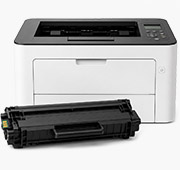
Shop by Canon Printer Series
PIXMA
Maxify
ImageClass
ImageRunner
LaserClass
BJC
PC Series
BJ Series
BN Series
S Series
C Series
CFX
EP Series
Fax Series
FaxPhone
FC Series
FP Series
GP Series
I Series
LBP
MultiPass
NP Series
P Series
StarWriter
Other Canon
1ink.com sells remanufactured and compatible ink, ink bottles and toner for Canon printers, including PIXMA, MAXIFY, MegaTank and imageCLASS. We don't sell Original Canon cartridges. Every cartridge and bottle comes with a 180-day warranty, and orders over $65 ship free within the lower 48 states.
How to find the right Canon cartridge
- Know the cartridge number? Use the Shop by Cartridge Number menu at the top of this page, or type the number (for example 245XL, PGI-280XXL, GI-21 or 055H) into the search bar.
- Know the printer model? Choose your printer series above, such as PIXMA, MAXIFY or imageCLASS, then your model. You'll only see supplies that fit that printer.
- Not sure of either? The cartridge number is printed on the label of the cartridge you're replacing. The printer model, such as PIXMA TS3320 or imageCLASS MF445dw, is on the front or top of the printer.
XL (high yield) and XXL (super high yield) ink fits the same printers as the standard cartridge with the same number. For Canon toner, an H after the number means high yield. Page yields are listed on each product page.
The three kinds of Canon ink
- PG and CL cartridges (such as PG-245XL and CL-246XL) have the print head built into the cartridge. Ours are remanufactured: used Original Canon cartridges that are cleaned and refilled.
- PGI and CLI ink tanks (such as PGI-280XXL and CLI-281XXL) are separate color tanks. The print head stays in the printer. Ours are compatible, which means newly made by a third party.
- GI ink bottles refill the built-in tanks of Canon MegaTank printers. Ours are compatible.
Our Canon toner cartridges are compatible.
Which Canon cartridge fits my printer?
Canon PIXMA ink cartridges
- Canon PG-245XL and CL-246XL: PIXMA MG2420, MG2520, MG2920, MG3020, MX490, TR4520, TS202, TS302, TS3120 and TS3320
- Canon PG-240XL and CL-241XL: PIXMA MG2120 to MG4220, MX372 to MX532, TS5120
- Canon PG-275XL and CL-276XL: PIXMA TR4720, TS3520 and TS3720
- Canon PG-260XL and CL-261XL: PIXMA TR7020, TS5320 and TS6420
- Canon PG-210XL and CL-211XL: PIXMA iP2700, MP230 to MP499, MX320 to MX420
- Canon PGI-280XXL and CLI-281XXL: PIXMA TR7520, TR8520, TR8620, TS6120 to TS6320, TS8120 to TS8320, TS9120 and TS9520
- Canon PGI-270XL and CLI-271XL: PIXMA MG5720, MG6820, MG7720, TS5020, TS6020, TS8020 and TS9020
- Canon PGI-250XL and CLI-251XL: PIXMA iP7220, MG5420 to MG7520, MX722 and MX922
- Canon PGI-225 and CLI-226: PIXMA iP4820, iP4920, MG5120 to MG8220, MX882 and MX892
- Canon PGI-220 and CLI-221: PIXMA iP3600, iP4600, iP4700, MP560 to MP640, MX860 and MX870
Canon MAXIFY ink cartridges
- Canon PGI-1200XL: MAXIFY MB2020, MB2120, MB2320 and MB2720
- Canon PGI-2200XL: MAXIFY iB4020, MB5020 and MB5320
Canon MegaTank ink bottles
- Canon GI-290: PIXMA G1200, G2200, G3200, G4200 and G4210
- Canon GI-21: PIXMA G1220, G2260 and G3260
- Canon GI-20: PIXMA G5020, G6020 and G7020
- Canon GI-25: MAXIFY GX1020 and GX2020
- Canon GI-26: MAXIFY GX6020 and GX7020
Canon imageCLASS toner cartridges
- Canon 137: imageCLASS LBP151dw, MF212w to MF249dw
- Canon 057: imageCLASS LBP226dw to LBP237dw, MF445dw to MF455dw
- Canon 052H: imageCLASS LBP214dw, LBP215dw, MF424dw to MF429dw
- Canon 051H: imageCLASS LBP162dw, MF264dw, MF267dw and MF269dw, including the II models
- Canon 070: imageCLASS LBP246dw, LBP247dw, MF462dw and MF465dw, including the II models
- Canon 071: imageCLASS LBP122dw, MF272dw, MF273dw and MF275dw
- Canon 119: imageCLASS LBP251dw, LBP6300dn, MF414dw to MF419dw, MF5850dn to MF6180dw
- Canon 128: imageCLASS D530, D550, MF4412 to MF4880dw
- Canon 055H set: imageCLASS MF741cdw and MF743Cdw
- Canon 054H set: imageCLASS LBP622cdw, MF641cw to MF644cdw
- Canon 046H set: imageCLASS LBP654cdw, MF731cdw to MF735cdw
- Canon 045H set: imageCLASS LBP612cdw, MF632cdw and MF634cdw
Warranty and returns
- 180-day warranty on every cartridge and bottle.
- Defective cartridge or bottle: within 90 days, you can choose a refund, replacement, or store credit. From day 91 to 180, we offer a replacement or store credit.
- Unopened cartridges and bottles can be returned within 90 days.
- Please contact us for a Return Merchandise Authorization (RMA) number before shipping anything back.
- Shipping charges are not refunded unless we sent the wrong item.
Read our full Return Policy.
Frequently asked questions
Are Canon 240XL and 245XL interchangeable?
No. Canon cartridge numbers that look alike aren't interchangeable. PG-240XL and CL-241XL fit printers like the PIXMA MG3620 and MX472. PG-245XL and CL-246XL fit printers like the PIXMA MG2520, TR4520 and TS3320. The same goes for PGI-270 and PGI-280. Use the number on your old cartridge, or choose your printer model on our site.
Can I use a high-yield cartridge instead of the standard one?
For Canon ink, yes. XL and XXL cartridges fit the same printers as the standard cartridge with the same number, and they print more pages.
Will using 1ink.com cartridges void my Canon printer warranty?
No. Under the Magnuson-Moss Warranty Act, a printer company can't void your warranty just because you use a non-original cartridge.
My Canon printer says the ink level can't be detected. What should I do?
Canon printers may show this message with a remanufactured or compatible cartridge. Canon's manuals say you can keep printing by pressing and holding the printer's Stop button for at least 5 seconds. The printer will stop showing the ink level for that cartridge, so replace it when your prints start to fade. If the printer still won't print, call us at (818) 534-2660, Monday to Friday, 7 AM to 5 PM Pacific, before you send anything back.
My printer doesn't recognize my new cartridge. What should I do?
First, take the cartridge out and put it back in firmly. If that doesn't work, turn off your printer, unplug it for 2–3 minutes, then plug it back in and turn it on. This fixes most problems. If your printer still doesn't recognize the cartridge, call us at (818) 534-2660.
My new ink cartridge prints blank or faint pages. What should I do?
- Make sure the orange protective tape is fully removed from the new cartridge.
- Print a nozzle check page from your printer's menu. If lines are missing or faint, run the print head cleaning, then print the nozzle check again. You can do this twice.
- If it still isn't fixed, run the deep cleaning. If that doesn't fix it, turn off the printer, wait 24 hours, and run the deep cleaning once more.
If the pages are still blank or faint, call us at (818) 534-2660 before you send anything back.
My imageCLASS toner prints faded pages. What should I check?
- If the new cartridge has a sealing tape, make sure it is pulled all the way out. Leftover tape can cause poor print quality.
- Take the cartridge out, gently shake it 5 or 6 times to spread the toner, and put it back in.
- Make sure Toner Save is turned off in your print settings.
- Set the toner density to a darker setting.
- On a color imageCLASS, if the colors look faded or off, run the color calibration (Adjust Gradation) from the printer's menu.
- Make sure the paper is in good condition, and that the paper type and size in your print settings match the paper in the printer.
If the pages are still faded, call us at (818) 534-2660 before you send anything back.
How long can I store cartridges?
When stored properly, toner cartridges last up to 24 months and ink cartridges last up to 12 months. For best results, use them within 12 months.
How fast do Canon orders ship?
Orders placed by 12 PM Pacific, Monday to Friday, usually ship the same day. Delivery typically takes 2–5 business days. Shipping is free on orders over $65 within the lower 48 states, and $5.95 for smaller orders.